This page updated 16 Apr 2014
Version note: Applies to 8 & 9
The standard Will Tag Type in TMG includes standard Roles for Executor and Heir, in addition to the Roles of Principal and Witness. This allows the executor(s) and heir(s) to be entered as Witnesses and be properly described in their narratives. Still, I think this Tag Type can be improved in several ways. (A Role of Testator is also included, which is totally unnecessary in my opinion, since the Principal is obviously the testator of the will.)
I often find that the executor of a will is also an heir, but you cannot assign two Roles to the same person. Even if you could, the result would likely be odd narrative. So I have added a combined "Heir & Executor" role to accommodate this case. In addition, I find I often want to mention some heirs separately from others when describing their inheritances in the Memo of the Principal. So I created several "Heir" Roles so I can refer to them individually or in smaller groups. Further, I think some of the Sentences in the standard Roles can be improved upon.
Here is how I modified the standard Will Tag to accomplish this. Note that some of the entries are modifications of the standard Roles, and others are custom Roles:
| Role | Sentence |
| Principal | [P] left a will < dated [D]> <[L]><, [M]> |
| Witness | [SF] was a witness to the will of [P]< dated [D]> <[L]><[WM]><[M0]> |
| Heir, Heir2, etc. | [SF] was named an heir in the will of [P]<, [WM2],> < dated [D]> <[L]><, [WM1]><[M0]> |
| Executor, Executor2 | [SF] was named an executor in the will of [P]<, [WM2],>< dated [D]> <[L]><, [WM1]><[M0]> |
| Female Sentence: | [SF] was named an executrix in the will of [P]<, [WM2],>< dated [D]> <[L]><, [WM1]><[M0]> |
| Heir & Executor | [SF] was named executor and an heir in the will of [P]<, [WM2],>< dated [D]> <[L]><, [WM1]><[M0]> |
| Female Sentence: | [SF] was named executrix and an heir in the will of [P]<, [WM2],>< dated [D]> <[L]><, [WM1]><[M0]> |
| Mentioned, Mentioned2, etc. | [SF] was mentioned in the will of [P]<, [WM2],> <dated [D]> <[L]><, [WM1]><[M0]> |
Use: |
|
Notes: |
|
The Will Tag as I have defined it requires the user to type into the Memo field any description of the contents of the will that is to be included in the output for the Principal. When that description includes the names of executors, heirs, etc., those names can be typed into the memo. That works fine, but has three disadvantages. It invites errors in typing, the names are not updated should you later change the way you entered the referenced persons' names, and the names do not appear as links if you output to Second Site.
All those issues are solved by entering the names as Variables referring to the Witnesses entered in the Tag, rather than typing them in. But, in practice, I find that you often don't want to refer to all the heirs, say, as a group, but want to mention them separately. You can't do that when all the heirs are assigned a common Role, so I have created Roles of Heir1, Heir2, Heir3, etc. This allows individual heirs, or groups of heirs that will be discussed together, to each be assigned a separate Role.
An example may help explain the usage. Say you wanted to create the following description of the terms of a will:
You would enter the following in the Memo field to generate that text:
In this example, brother Matthew was assigned the Role "Executor" and son-in-law Rubin the Role of "Executor2" All the daughters are assigned the Role of "Heir" while the sons are assigned to "Heir2." Obviously, use of this method requires some thought about how the memo for the Principal will be crafted as the Roles are assigned to the other participants. Note that I've used different forms of the Role variables to produce first name only for the brother, full name for the son-in-law, and given names only for the children.
Typing in the Variables is bothersome and error-prone. Instead of typing them, user the right-click menu in the Memo field to select the desired Variable from the "Role" section near the bottom of the menu.
The Sentences for the Roles of Heirs, Executors, and Mentioned allow use of the Witness Memo of each of person with those Roles to record two things:
A general comment for that person, such as what an heir was to receive, which appears at the end of the output for that person. If used, this comment is entered in the Witness Memo.
An example may help explain the usage. Say you wanted to create the following output for an Heir:
You would enter the following in the Memo field to generate that text:
You can modify your existing Will Tag Type by copying the Roles and Sentences from this page, editing them as you prefer. Or, you can download and install a copy of my Tag Type using the Tag Type Import function.
If you choose to download you can import in either of two ways:
I recommend that you replace your existing Will Tag Type if you have not used the Testator or other Role not present in my Tag Type, unless you have already customized your Will Tag Type in such a way as to cause existing Will Tags to be disrupted. If either is the case, I recommend that you add my Will Tag Type as an additional Tag Type.
If you do want to proceed with the download and import process:
Operating System |
Default Folder Location |
Windows Vista Windows 7 Windows 8 |
C:\Users\{user}\Documents\The Master Genealogist v9\Export |
Windows XP Windows 2000 |
C:\Documents and Settings\{user}\My Documents\The Master Genealogist v9\Export |
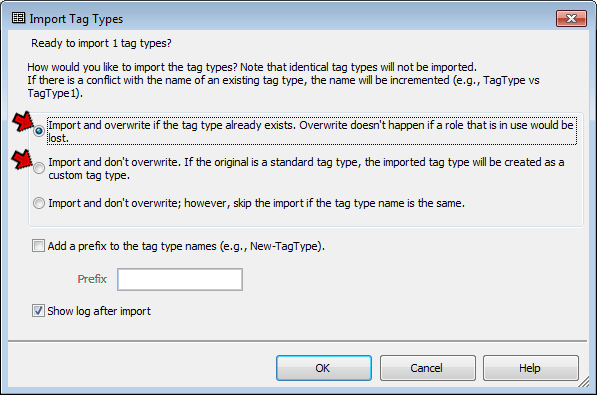
In that screen, you may choose to either:
- Replace your existing Will Tag Type – To do that, select the first option, "Import and overwrite if the tag type already exists." Click the OK button. If successful, you will get a confirmation message that the new Tag Types have been imported. If you have used any Roles not included in my custom Tag Type, you will receive a message that one or more Tag Types were not imported. You can then either create the new Roles manually, or use the alternate method below (recommended).
- Add as an additional Will Tag Type – To do that, select the second option, "Import and don't overwrite." The imported Tag Type will be called Will1 unless you check the "Add a Prefix" box below and enter a prefix, which will be applied to the Tag Type name. Click the OK button and you should get a confirmation message that the new Tag Types have been imported.
For further details on exporting and importing Tag Types, see my article Exporting and Importing Tag Types.
| ReigelRidge Home | Terry's Tips Home | Contact Terry |
Copyright 2000- by Terry Reigel