This page updated 30 Nov 2018
Version note: Applies to Second Site 6 &7
Once you have created a website with Second Site, you will probably want to share it with others. While you could just ask them to gather around your computer, that's not likely to be satisfactory. This article discusses how to either provide copies privately, for example by copying it to CDs and providing them to your relatives, or by placing it on the Internet so others can access it from their own computers.
|
Topics Included in this Article |
|
| Sending copies of your site to your readers on CD or thumb drive | |
| Placing your site on the Internet for all to see | |
| The hosting service that's built in to Second Site | |
| A hosting service that protects your efforts into the future | |
| Using other hosting services | |
Second Site creates webpages in a folder on your hard drive. You will probably need to make a number of trial runs of your site to get all the options set just the way you want them. You can view your work with a web browser on your computer, but when you are satisfied with the result, you will probably want to share it with others. To do that you can either copy the appropriate files to a CD, thumb drive, or other portable media and send that to others, or you can post them to a website.
When you create a site definition file (.sdf) in Second Site, the program also creates two folders, each with the same name as the sdf file, but with "-i" (for input) or "-o" (for output) appended. The folder with the -o added contains all the files for the webpages, and it's those files you copy to a CD or upload to a website. For example, if you name your site definition file "My Smith Family.sdf" you would copy all the files and folders in the "My Smith Family-o" folder to the CD or upload them to your website. Generally, you do not want to copy the folder itself – just the files and folders within it.
Distributing your webpages on CD or thumb drive offers the greatest security if they contain information you do not want to release to the general public, since access is limited to those that receive the device, or a copy of it. So long as you trust those to whom you provide a copy, you have some assurance that the information will not become publicly available. Pages posted to a website are generally available to the public, though various methods exist to make them private, offering varying degrees of security.
Your site can be distributed privately by copying the files created by Second Site to any portable device capable of storing computer files. The most common methods are by use of a thumb drive, also called a flash drive, or by making a CD or DVD.
To use a thumb drive, copy all the files in the "-o" folder, as described above to the drive. Making your site available on CD is as simple as "burning" the files within the "-o" folder to a blank CD with your CD drive, assuming, like most today, it is capable of "burning" files. If your computer has dedicated software for copying files onto CDs you may want to use that. But with WindowsXP or later you can use the capability built into Windows to do that:
Locate the "-o" folder in Windows Explorer
Click someplace within the file space, and then press Ctrl-A to select all files and folders
Drag the selected files to the icon for your CD drive, or if your layout for Windows Explorer displays a "Copy to CD" icon, click that
When prompted, let Windows copy the files to the CD
If you are going to make only a few CDs you can create them with your own computer. If you plan to make a substantial number of CDs you may want to explore a CD duplicating service. Wholly Genes, the makers of TMG, offers a CD & DVD Duplication service that has received positive feedback from users.
The concept of publicly available websites is fairly simple. You "upload," that is transfer copies of your site files, to a host computer. A host is a company that has computers connected to the Internet which are configured to receive and send files to other computers. Your readers then view your site in a web browser on their computers. The reader's browser "downloads," that is receives a copy, of your files from the host and displays them.
If you want to make your site public on the Internet you must obtain a web host. You then upload all the files created by Second Site to your web host. Your readers can then view them from any computer with Internet access and a standard web browser. Unless you password protect your site, it will be visible to anyone in the world. Once your site is found by search sites like Google anyone will be able to search for and locate information on your site. This can be a great way to connect with unknown cousins or others researching the lines you post.
The first chore after deciding to post your site on the Internet is to choose a web host. Your ISP (Internet Service Provider) may offer free hosting for web pages, although the amount of storage space is often limited, and thus may limit the amount of information you can include in your site. There is free hosting available from a number of sources, including RootsWeb, although "free" really means that ads will be placed on your site.
A second concern with using space provided by your ISP or one of the "free" services is the web address users must type into their browsers to locate your site. In most cases, if you use use a paid host you can choose your own "domain name" - ReigelRidge.com or SmithFamily.net, for example. This provides your readers have a web address that makes sense to them. But if you use "free" space you are generally assigned a web address that may look like "webpages.charter.net/treigel," which is not as easy for your readers to use.
In my view, if you have invested effort to develop a site you are proud of it's worthwhile to pay for hosting services so your site can be ad-free and have a web address of your own choosing. When you do that your domain, or web address, stays the same if you should decide to move to a different host.
No doubt the simplest way to obtain hosting for a site created with Second Site is to use Family History Hosting, the service offered by John Cardinal, the author of Second Site. The advantages are hassle-free uploads from within Second Site, first-rate support, and a service designed for genealogist that doesn't require learning a new technical language. Users who have made use of this service have raved about it. And I found the price less than what my previous host was charging.
Uploading your site is very simple when you use Family History Hosting. After you purchase your hosting package you receive an email with a few critical items you need to enter into Second Site to allow it to access the host. You enter them in the Pages > Publish section, as shown below:
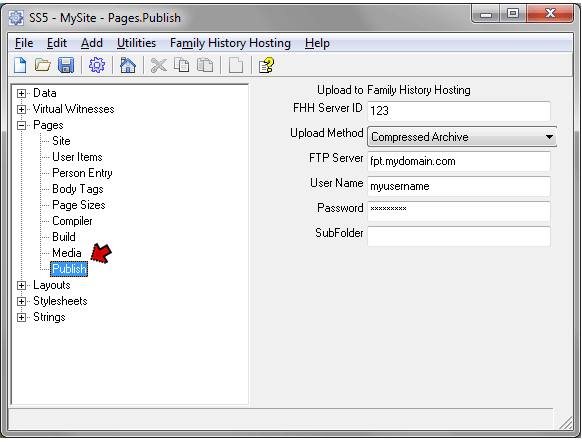
In that screen you enter:
FHH Server ID – enter the number provided in the email
Upload Method – choose "Compressed Archive" if possible. It is much faster than the "File by file" method, which should only be used if the Compressed Archive method doesn't work for you, for example if your site is very large.
FTP Server – enter the FTP address provided in the email, something like "ftp.mydomain.com"
User Name – enter your user name as provided in the email
Password – enter your password. If you leave this blank, you will be prompted for it each time you upload your site, which is actually more secure than entering it here.
Subfolder – leave blank unless you are doing something advanced like creating multiple subsites that require separate subfolders
You generally only need to enter the above information once, unless you for some reason decide to create a new site definition file, in which case you will have to re-enter it. Once you have entered the information Second Site needs to access the host site uploading your site to the host is very simple. Once you are satisfied with your site and are ready to upload, use the Family History Hosting > Publish menu item on the top line of Second Site to open the Upload to Family History Hosting screen:
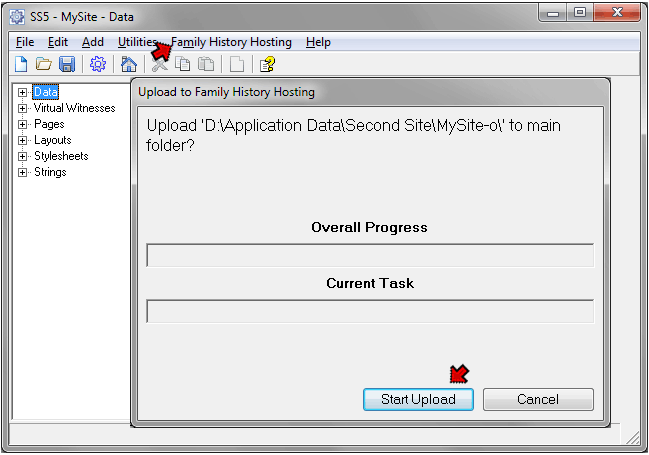
Click the Start Upload button, and the upload begins. A progress bar shows you the progress of the upload. When it has finished a message reminds you to wait briefly for the compressed files to be expanded for use. After a couple of minutes your site will be available from the host.
A serious concern for many users is that after investing much time and effort into researching, documenting, and publishing their family history on a website, most hosts simply delete your site when you stop paying the annual hosting bill. John Cardinal, with his FamilyHistoryHosting service, offers a service specifically designed to address this issue.
Their Archive Plans differ from the usual hosting plans offered by them and others in that you pay an up front "set-up" fee which is essentially paying for ten years of hosting. Then each year you pay a fee for an additional year's hosting, renewing the ten-year period. When you no longer pay the annual renewal fee for any reason hosting continues for the remainder of the ten year period. An interesting feature is that others, presumably family members, can choose to "sponsor" your site by paying the annual fee thereby extending the life of your site.
In order to make this service manageable and to keep the rates at a reasonable level some features common to hosting services are not included. The two main ones are email service and use of a unique domain name.
By not including email service I'm sure they eliminate a considerable amount of support effort that is required to deal with the various email issues that arise from time to time. Also, there is no need to set up a way to deal with the email accounts after the user is no longer supporting the site.
By not allowing customers to use their own domain names the complexity and expense of renewing registration of the domain name over the ten-year extended period is eliminated. The address of your site is something like "www.genarchives.com/reigelridge."
A few other features not commonly used by family historians, such as multiple domains, sub-domains, and FTP accounts, are also not included for the same reasons.
Users can use this service option in either of two ways:
There is a list of sites using this service whose owners have agreed to make them public on the GenArchives directory. If you look at the sites listed you will see examples of both methods being used.
While a ten-year plan is not truly permanent, I believe it may be long enough for a permanent archiving of websites to be developed. We have the first evidence of such an archive today in Archive.org's Wayback Machine. The current effort suffers from several shortcomings, most notably the lack of a search capability so that a reader can locate information with any of the archived sites. The reader must enter the name of the site containing the desired information, which in general the reader is unlikely to know. Given the rapid advances in information technology in recent years we can hope this and other obstacles will be resolved before long. The ten-year life of a site under this Archive Plan may be long enough to see that happen.
You may for one reason or another choose to use a different hosting service. Or, you may prefer the webspace included with your ISP service, or one of the "free" ad-supported services. If you decide on a paid hosting service users have reported they are happy with a variety of services. You might check the archives of the Second Site list for their comments.
If you do not choose its affiliated service, Second Site does not attempt to provide a means for uploading your site to the wide variety of hosting services available. Unless your host gives different directions, you will need an FTP program to do that task. I've used CuteFTP for a number of years and been very happy with it, but other users have reported satisfaction with other FTP programs, some of which are free. Again, check the archives of the Second Site list for their comments.
| ReigelRidge Home | Terry's Tips Home | Contact Terry |
Copyright 2000- by Terry Reigel